Attendance and hours
Know who turned up and how many hours each learner has done
Take registers in a minute, flag the learner who is slipping, and report off-the-job hours against each learner's plan, on a report you can hand to the employer.
Last checked
Attendance
A register for each class
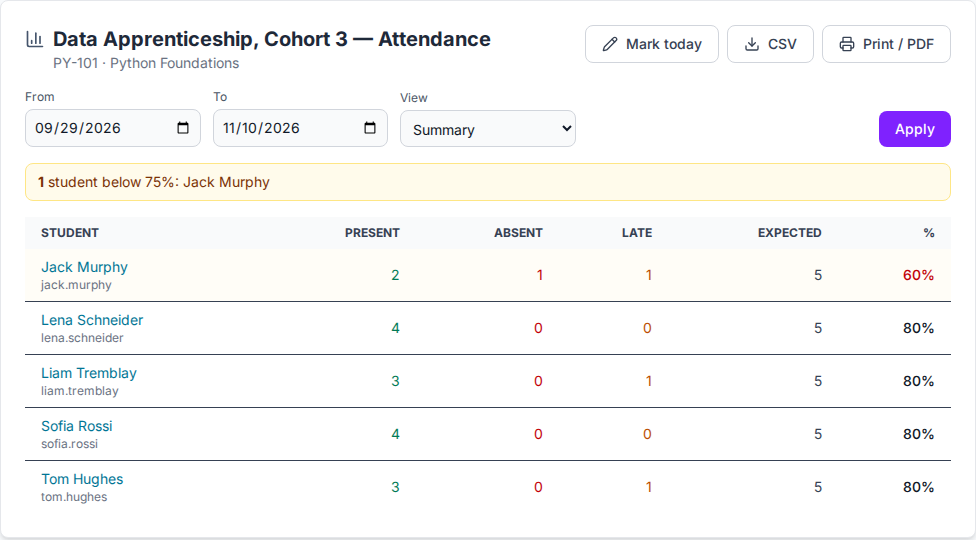
Mark present, late or absent for each class on the timetable, with a note, and print the register for a session.
From a Zoom or Teams report
Upload the participant report. Learners are matched by email and marked present, with minutes when they were there for less than the session; the rest can be marked absent.
Classes that are off
A cancelled class or the school's time off is not a session and has no register, so attendance percentages stay honest.
Learners who are falling behind
The batch summary lists present, absent and late for each learner and flags those below an attendance percentage, with a CSV to export.
Off-the-job learning hours
Training plans In the Training plans, the 30-day trial and the free plan; not in the Teacher plan. Pricing
Hours worked out from the timetable
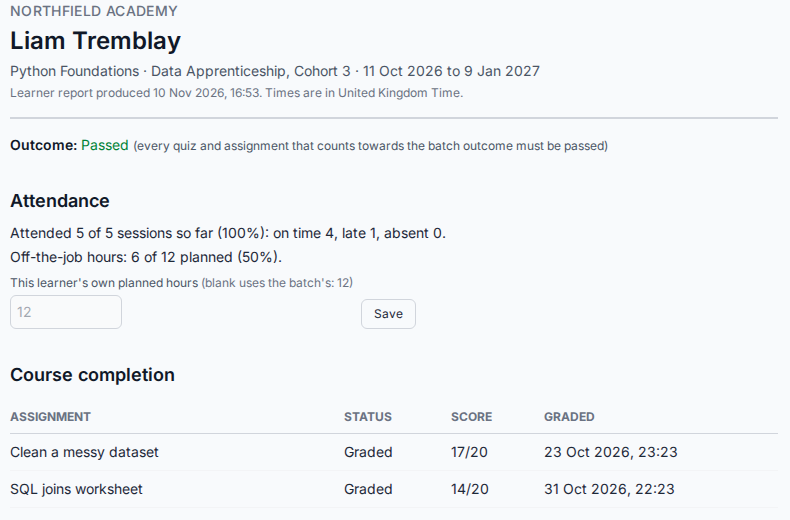
A session is worth what the timetable says. Present and late learners are credited with it, or with the minutes you enter. A later timetable change never re-values past sessions.
Against each learner's plan
Set planned hours for a batch, or for one learner. The learner report and the progress export show the hours done against them.
Evidence for the employer
Attendance and hours appear on the printable learner report, and on each employer's own view when you use the client view.
Images show an imaginary school, Northfield Academy. See also the client view and learner reports, the Zoom and Teams import and the apprenticeship demo.
Questions and answers
Which plans include attendance and off-the-job hours?
Registers and attendance reports are in every plan. Off-the-job hours are a Training feature: in the free trial, the free plan and the Training plans (from $99 a month), and not in the Teacher plan.
Does it produce a signed apprenticeship progress review?
No. It records attendance and hours against a plan and prints them on a learner report. Signed tripartite progress reviews are not part of the product.
Can a teacher fill in the register after the class?
Yes, by hand or from a Zoom or Teams report. A substitute teacher marks the register of the class they cover and sees nothing else of the batch.
What counts as a session?
A class of the batch's timetable within its dates that is not cancelled and not on the school's time off.
Can learners be reminded of classes?
Yes. Learners, or a child's parents, can be emailed the day before, two hours before or both, with the class link or place.
Try it with your next cohort
Start a 30-day free trial with up to 30 learners and no card, or see the demo for your kind of class and book a call with us.