For universities and colleges
Grade a computing course of hundreds without a campus deal.
Autograded code with the instructor's own tests, rubrics the teaching assistants share, similarity checks and a replay of how each answer was written, for a course of a few hundred students. One instructor can start a single course on the free plan, with no campus contract.
Training 100 is $249 a month for 100 students: about $10 a student for a four-month term. Teachers and assistants are free.
Last checked
Grading that scales
What an instructor and their teaching assistants use week to week.
Your tests, partial credit
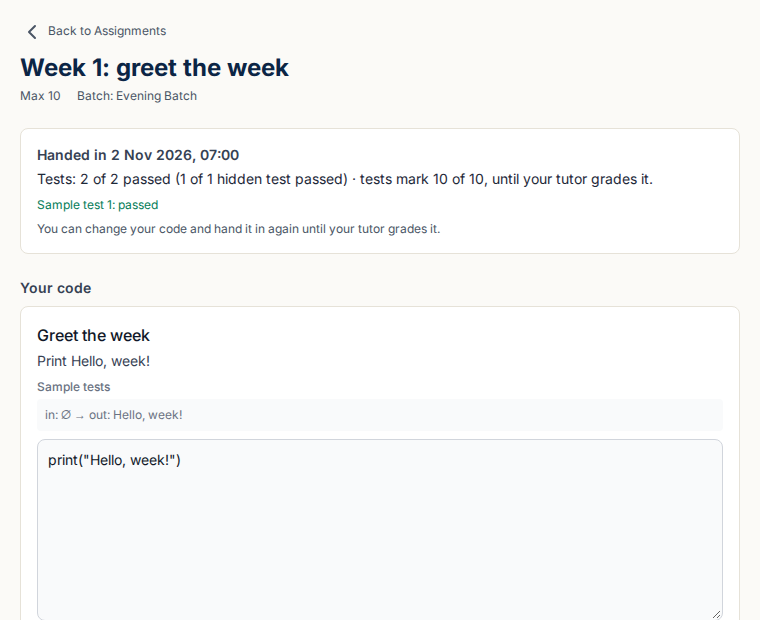
Write tests for a question, with hidden ones, and each answer is run against all of them in 12 languages. A question can give the program up to 20 files in folders, 1 MB together, binary data included. A test can carry code that calls the student's functions, as a driver program with its own main in compiled languages, and can pass simply by running without an error. Marks follow the share of tests passed.
Rubrics for the teaching assistants
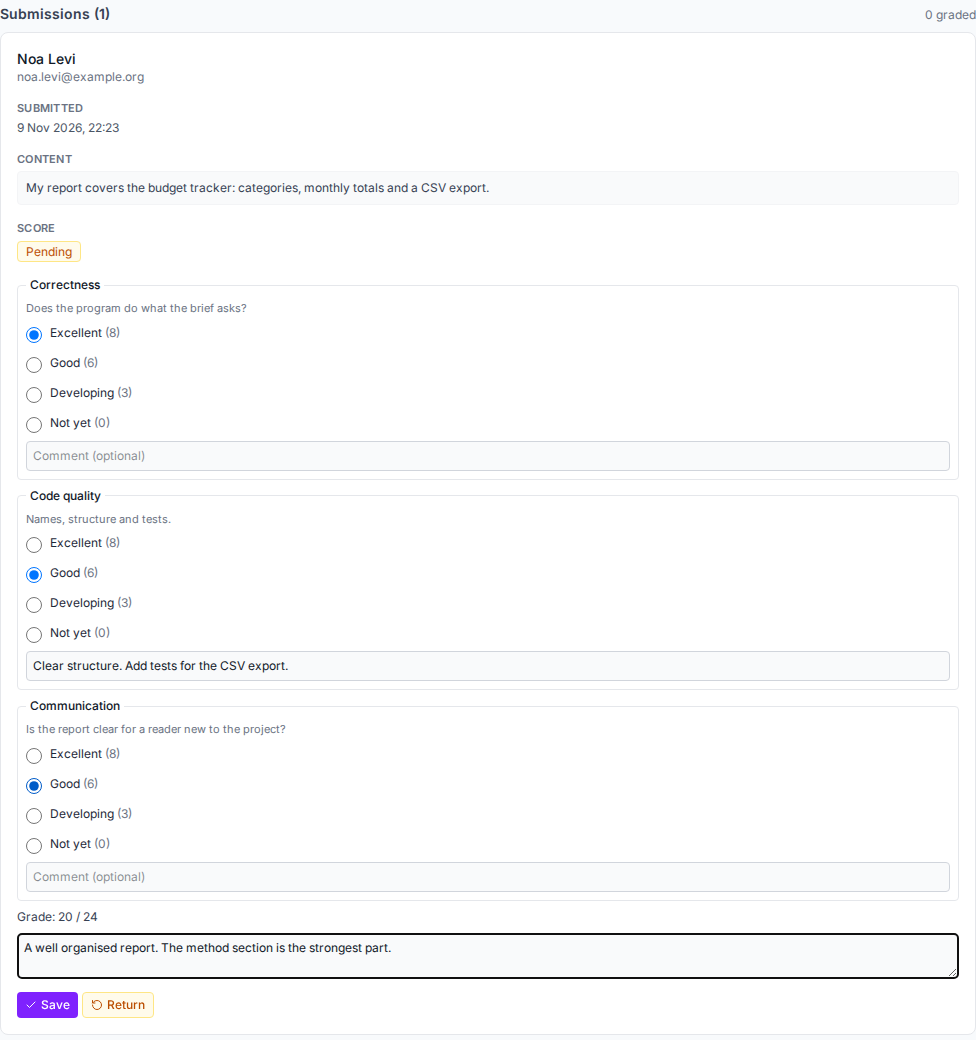
Staff grade against a shared rubric of criteria and levels, and a hand-in can mix the tests’ marks with a rubric. Sections are batches, each with its own instructors and assistants, and staff see only the work they may grade.
Comments on lines of code
Comment on a line or a range of lines of a handed-in answer. Students see the comments with their result, never before.
Regrade requests
A student asks about a mark and says why, within the days you set. Staff reply, keep the mark or change it from the page where they mark the work, and the student is emailed.
Extensions and late work
Give one student a later due date, or set a rule: late penalties by the day with a cut-off and a floor, which an assignment can override. Staff can waive a penalty, and the gradebook and exports show it.
Where students are stuck
For each coding assignment and quiz, see every student’s time spent, checks of their code, errors, tries and tests passed, with those who may need help listed first and why. Students never see it.
More on the gradebook, rubrics, late work and regrades and coding assessment, or try an exercise marked by hidden tests.
Evidence when AI writes code
Tools that help an instructor judge how the work was done.
Replay of every answer
Each change to a quiz answer is kept, and staff play it back to see how the code was written, with pastes counted. A case for the integrity office starts from evidence, not a guess.
Similarity checks
Answers to a coding question are compared across the course, leaving out the starter code and what most students share, and pairs that are 60% alike or more are listed for a person to look at.
Exam conditions
Set a sitting code, the networks a quiz may be taken from, one browser session for each attempt and a limit on pasting. A log shows where a student left the test page, to look into and never a mark. There are no webcams or face matching.
Hints, not answers
Switched on by your admin, students ask for up to three levels of hint on a coding answer. Each is checked before it is shown: no block of code in the first two levels, and at most five lines in the third. Never offered in an exam.
Where students write and run code
Code in the browser
Students write and run code on the page with nothing to install, then hand in for grading.
Notebooks
Python notebooks that run in the student’s browser, with code questions answered and graded from a notebook.
Labs with a terminal
Each student can get JupyterLab with a terminal in a container of their own. At most 40 new labs open a week across the whole platform and 3 run at once beside the app, so a course of hundreds needs a plan made with us first.
Inside your learning system
What university IT will ask first.
LTI 1.3 with grades back
Launch quizzes from your learning system and return the grades to its gradebook. We have tested it end to end with Moodle 4.5. Canvas, Blackboard and Brightspace speak the same standard, but we have not tested with them yet; tell us which you use and we will set it up with you.
Roster at first launch
Each student gets an account, with their learning-system role, the first time they open the tool. The course roster is not copied ahead of that.
Sign-in
Google, Microsoft, or a code sent to the student’s email. There is no SAML single sign-on yet.
See Moodle over LTI 1.3, the security page, the student data privacy page and the accessibility statement.
What it does not do
- No scanned paper exams and no GitHub or GitLab hand-in.
- No SAML single sign-on, and no SOC 2 or ISO 27001 report (the HECVAT is available on request).
- No course content or textbook: you write the lessons and questions.
- Rosters come at a student’s first launch, not ahead of it.
Compare us with Gradescope, or see every comparison.
Questions and answers
What does it cost for one course?
A subscription is priced by active learners a month, and teachers and assistants are free. Training 100 is $249 a month for up to 100 active learners. For a four-month term that is $996, about $10 a student at list price; Training 200 is $399 for up to 200, then $1.75 a month for each learner above that. Prices are in US dollars, excluding taxes. The free plan has 30 learners and every feature, to try one assignment first.
Is it FERPA compliant?
For an institution that FERPA covers and whose annual notice of rights names contractors as school officials, we act as a school official with a legitimate educational interest, and we review and sign a university’s own student data privacy agreement. Read the details on the student data privacy page before you decide, and ask us for anything it does not answer.
Do you have a HECVAT?
The HECVAT is available on request from hello@theskillsite.com, and we answer your own security questionnaire too. The security page says what we hold today and what we do not: we have no SOC 2 or ISO 27001 report.
Does it work in Canvas?
It is built to LTI 1.3, which Canvas supports, but we have only tested it with Moodle 4.5. We will not claim Canvas until we have tested it with you.
Is it accessible?
The main public, learner and staff pages are checked automatically against WCAG 2.2 A and AA on every release. The accessibility statement says what that does and does not cover, and a conformance report is available on request.
Can it grade paper exams or take a Git hand-in?
No. Work is handed in on the page, as code, files or a recording. It has no scanned paper exams, no GitHub or GitLab hand-in and no ready-made course content.
How does it compare with Gradescope?
Gradescope, which its home page says is used at more than 2,600 universities, grades paper exams, which we do not. We run coding in the browser with notebooks and labs and sell one course without a campus deal. The comparison sets them side by side, with the date each fact was read.
Try one assignment before the term starts
Start free with 30 students and every feature, or tell us about your course and we will set up an assignment with hidden tests for it.